Subtitles. Voiceovers. Compliance.
All on Your Mac — Offline.
Add styled captions, export SRT/VTT for YouTube, and generate AI voiceovers without uploading your footage to a subscription cloud service. One-time purchase. No monthly fees. No cloud uploads.
Free forever · macOS 13+ · Apple Silicon · No signup required
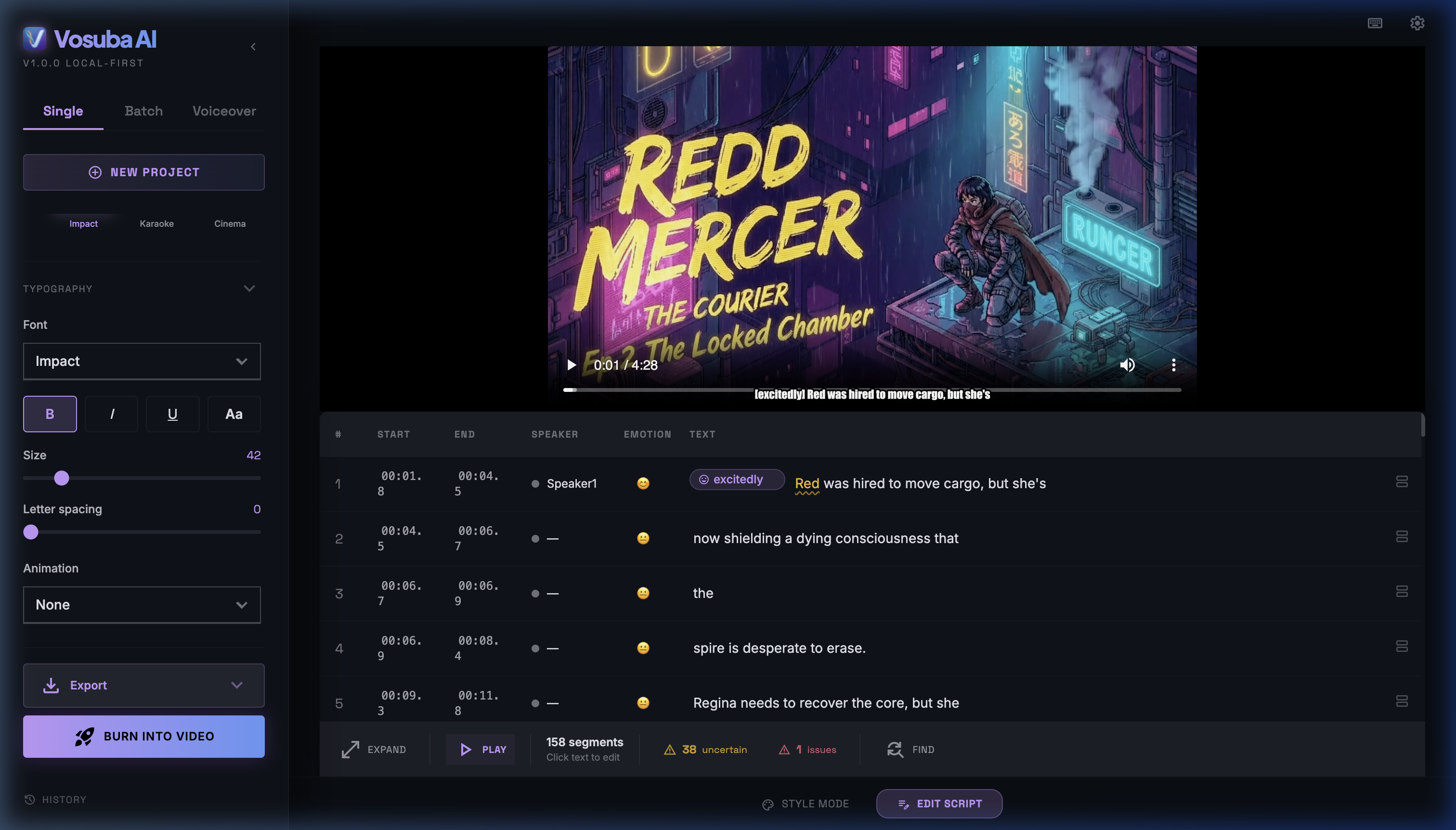
One tool for the full subtitle workflow
From raw recording to upload-ready file in minutes
Auto-transcription
Drop any video or audio file. Whisper-powered transcription runs locally — no cloud account, no wait, no privacy risk. Works on MP4, MOV, MKV, and more.
Edit & time-sync
Edit captions inline in the built-in timeline editor. Adjust start/end times, fix word breaks, and split or merge segments before export.
Style your subtitles
Choose font, size, colour, outline, position, and background. Create the bold one-word-at-a-time style popular on short-form video — or clean broadcast-style captions.
Export for any platform
Export SRT for YouTube, VTT for web players, ASS for DaVinci Resolve / Final Cut Pro, or burn subtitles permanently into an MP4 — all from one app.
AI voiceover studio
Generate natural-sounding voiceovers in 26 neural voices — expressive, offline, and built for narration, B-roll, or text-to-speech demos.
WCAG compliance check
Built-in validator checks reading speed (CPS), line length, and synchronisation against WCAG 2.2 AA criteria — useful if you publish to institutional or government channels.
Stop paying per-minute forever
How Vosuba compares to common cloud-based alternatives for independent creators
| Feature | Vosuba | Submagic | Captions.ai | Rev (AI) |
|---|---|---|---|---|
| Business model | One-time purchase | Monthly subscription | Monthly subscription | Per-minute billing |
| Starting price | $49 one-time | ~$20/month | ~$17/month | $0.25/min AI · $1.99/min human |
| Footage uploaded to cloud | Never | Always | Always | Always |
| Works offline | ✓ | ✗ | ✗ | ✗ |
| AI voiceover included | ✓ | ✗ | ✗ | ✗ |
| WCAG compliance check | ✓ | ✗ | ✗ | ✗ |
| SRT / VTT / ASS export | ✓ All three | SRT only | SRT / VTT | SRT / VTT |
| Platform | macOS only | Web / Mobile | Web / Mobile | Web |
Competitor pricing sourced from public pricing pages as of April 2026. Subject to change. See full Submagic comparison, Captions.ai comparison, Descript comparison, and CapCut comparison.
💰 What switching to Vosuba actually saves
A typical YouTube creator publishing 2 videos per week (each 10-15 minutes long):
(per year at $20–40/mo)
(100+ min/mo × $0.25/min × 12)
(one-time, unlimited forever)
Based on 2 videos/week × 12 minutes avg. See our guide to adding subtitles on Mac to get started.
Who uses Vosuba
YouTubers and video essayists
Burn styled captions into your export for maximum accessibility and watch-time. Export SRT for YouTube's built-in caption system. No upload limits, no per-video fees — caption entire back-catalogues overnight.
Podcasters adding video
Convert recordings to video with captions already burned in. Generate an AI-voiced version of your script for multilingual clips or short-form cuts — all without leaving your Mac.
Freelance video editors
Deliver captioned exports to clients fast. Export ASS files that import directly into DaVinci Resolve and Final Cut Pro. Run multiple jobs in batch without a cloud queue.
Short-form creators (TikTok / Reels / Shorts)
Style captions for the vertical video format — large text, high contrast, word-by-word highlight. Keep your raw footage local and private; don't hand your unreleased clips to a cloud service.
Multilingual content creators
Generate AI-voiced narration or produce separate SRT files per language for the same source video. Localise once, export to any platform.
Common questions
Does Vosuba work without an internet connection?
Yes. Once installed, Vosuba runs entirely on your Mac. The AI transcription model (Whisper) and TTS models run locally using Apple Silicon acceleration. No internet is required for transcription, subtitle editing, or voiceover generation. An internet connection is only needed for the initial download and licence activation.
What's the difference between the tiers?
Free — unlimited transcription, basic subtitle export, 3 style presets, watermarked burn-in. Creator ($49 one-time) — all Whisper models, no watermark, all 10 presets, sound detection (SDH), and the caption accessibility dashboard. Pro ($99 one-time) — everything in Creator plus the Voiceover Studio (26 AI voices, voice cloning), batch processing, and priority support. See the full breakdown on the pricing page.
How accurate is the transcription?
Vosuba uses OpenAI's Whisper model. On clear audio with a native speaker, word-error rates are typically low (under 5% for English). Accuracy drops with strong accents, overlapping speakers, or noisy environments. You can edit every caption segment in the built-in editor before export.
Can I burn subtitles into a video for social media?
Yes. Vosuba uses FFmpeg to render styled subtitles directly into your video output file. The result is a single MP4 with captions permanently embedded — ready to upload to any platform without relying on that platform's caption system.
Creator resources
How to Add Subtitles on Mac
Step-by-step guide from raw video to captioned export.
YouTube SRT Upload Guide
Generate and upload SRT files to YouTube Studio.
SRT vs VTT vs ASS Explained
Which subtitle format to use for each platform.
Offline SRT Generator
Generate SRT files from any video without uploading to the cloud.
Start captioning your videos today
Download Vosuba free — upgrade to Creator ($49) or Pro ($99) anytime. No subscription. Runs on any Mac with Apple Silicon (M1 or later).